Getting the Most Out of Auggie
A Practical Guide for Marketers Running Virtual Focus Groups
Quick Start: Get Value from Auggie in 30 Minutes
The first two pages show you how to run one high-quality customer conversation that surfaces real insight - fast.
1) Set Up for Real Reactions (5 min)
In Discovery, be specific:
- Who the customer is (role, size, constraints)
- What problem you actually solve
- 2-3 real goals (even if they compete)
2) Upload (Optional but Powerful - 2 min)
Share up to 3 files like brand guidelines, marketing materials, or research documents to enrich the persona generation.
3) Sanity-Check Personas (2 min)
Before editing:
- What does each persona care about most?
- What would make them say no?
- Where do they naturally disagree?
Don't edit just to clean up wording. Good personas create tension.
4) Run the Focus Group (10 min)
Start broad apply pressure.
- Read the Pre-defined questions. Ask your own.
- Push deeper
- Ask an individual personas to react to by using "@" to select them
- Ask one persona to react to another persona's feedback
- Upload a specific file you want feedback on
- Force tradeoffs
- Follow the strongest objection
5) End & Decide One Next Step (1 min)
Generate the Insights Report. Look for:
- Repeated objections
- Trust gaps
- Where personas diverge
Decide one thing to test next:
- Messaging change
- Proof point
- Follow-up focus group
Want More Specific Detail and Best Practice Examples? Keep Reading!
Read Sections 1 (Discovery), 4 (Running Focus Groups), and 6 (Insights Report).
Example: Strong Session vs. Weak Session
Weak Session:
Discovery Input: "We're a wine analytics platform for wineries of all sizes."
Persona Generated: Generic "Marketing Manager" who says things like "This looks interesting" and "I'd need to learn more."
Question Asked: "What do you think about this?"
Result: Polite, non-committal feedback. No clear next step.
Strong Session:
Discovery Input: "CorkVision is an Al copilot for wineries doing $1M-$10M in DTC revenue-large enough to have complex data, too small to afford a full analytics team."
Persona Generated: Operations-focused winery manager who values ROI, integration with WineDirect/Commerce7, and time savings.
Question Asked: "What would make you distrust a tool like this?"
Persona Response: "If it promises 'insights' without showing me exactly where the data comes from, I'd assume it's another dashboard I have to babysit. I need to see connector health, reconciliation logs, and proof it saved someone like me actual hours-not just vague 'efficiency gains."
Result: Clear positioning gap identified. Next step: Add data lineage visibility to messaging and test proof points with follow-up session.
1. Discovery: Setting Up for Strong Results
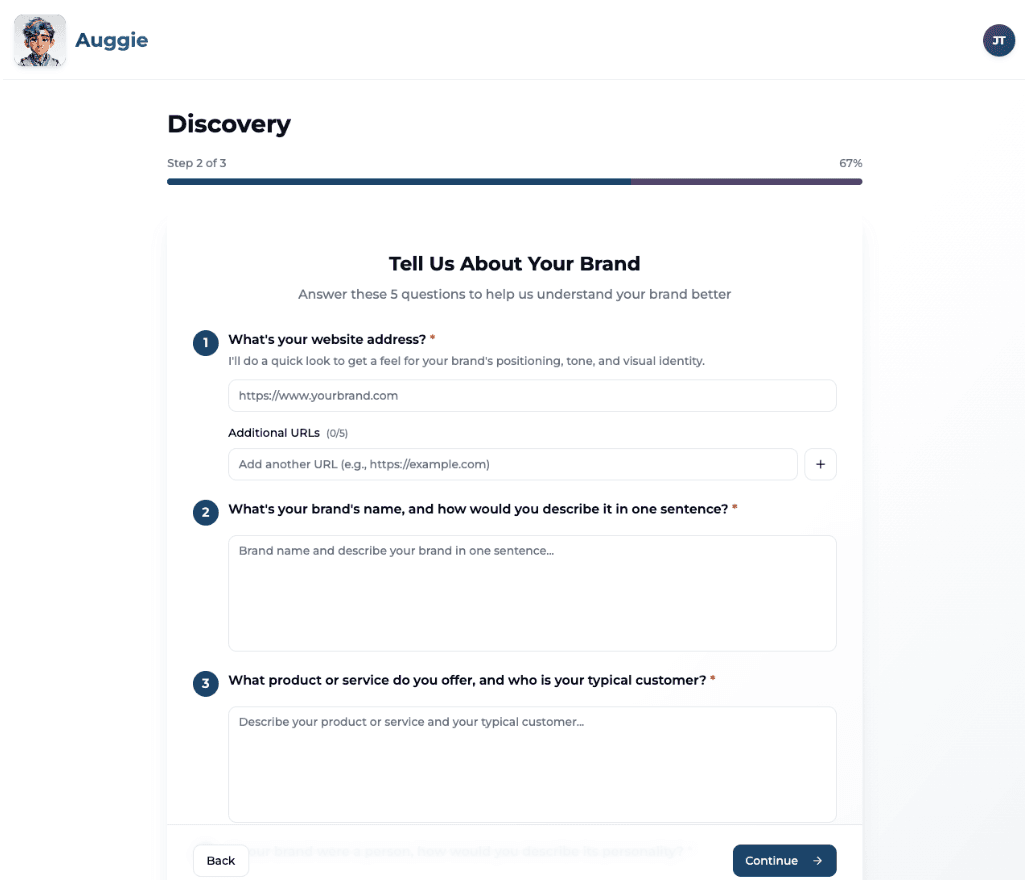
The five questions in Discovery directly shape how personas think, speak, and react. Specificity here determines realism later.
Best practices:
1. Website Address (and Additional URLs)
Auggie uses your website(s) to infer positioning, tone, audience sophistication, and proof expectations.
Primary site: https://corkvision.com
Supporting URLs that represent different contexts:
- Pricing page
- Campaign microsite
- Customer story page
This helps personas react differently to brand story vs. commercial reality.
- A temporary landing page only
- A "coming soon" page
- Social profiles instead of websites
2. Brand Name + One-Sentence Description
This sentence heavily influences how personas interpret your value.
"CorkVision is an Al copilot for wineries that unifies DTC data from tools like WineDirect, Commerce7, and Mailchimp to surface actionable insights, automate workflows, and drive revenue growth without adding headcount."
Why this works:
- Names the audience
- States the problem
- Explains the outcome
- Sets ROI expectations
"CorkVision is a modern analytics platform for the wine industry."
"We help businesses unlock insights through Al."
These are too vague-personas don't know why they should care.
3. Product/Service + Typical Customer
This is where realism is won or lost.
"CorkVision provides Al-powered analytics, workflow automation, and intelligent recommendations for wineries selling direct-to-consumer. Our typical customer is a winery doing $1M-$10M in annual DTC revenue-large enough to have complex data, but too small to afford a full analytics team."
Why this works:
- Defines scale and constraints
- Explains why the product exists
- Sets sophistication level
Personas now understand what resources are limited and what tradeoffs matter.
4. Brand Personality (If Your Brand Were a Person)
This shapes emotional response to messaging.
"Insightful yet grounded. Confident without being arrogant. Innovative without being overly technical. Empathetic to the chaos of winery operations. Think: the operator's co-pilot, not a flashy tech product."
Why this works:
- Uses contrasts
- Anchors personality to behavior
- Signals tone boundaries
Next-Level: Use personality to set expectations-personas will push back on claims that contradict your stated tone.
5. Main Goals Right Now
Multiple goals create realistic tension.
"Our immediate goals are (1) customer acquisition through 10-15 pilots with measurable ROI, (2) brand awareness via thought leadership and case studies, and (3) investor readiness through a repeatable GTM motion."
Why this works:
- Creates competing priorities
- Surfaces different success metrics
- Enables realistic skepticism
If a real prospect wouldn't understand your brand from what you wrote here, your personas won't either. Strong Discovery inputs lead to sharper disagreements, better follow-up questions, and more useful tension.
2. Uploads: What to Upload (and When to Skip It)
Uploads don't add volume-they add realism. You can run strong sessions without uploads, but the right uploads dramatically improve specificity and pushback.
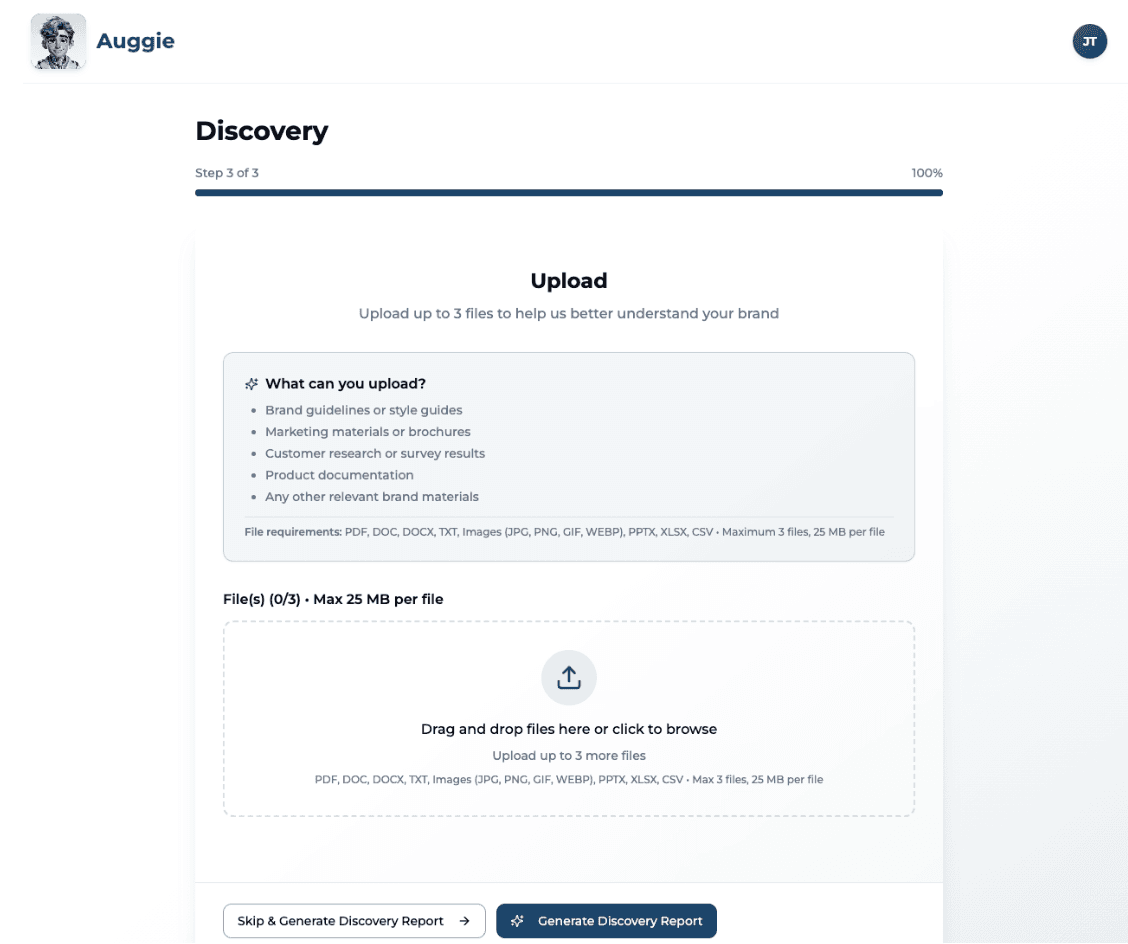
What Uploads Are Best For
Uploads are most valuable when you want personas to:
- React to real messaging
- Evaluate clarity vs. confusion
- Respond like buyers, not theorists
- Surface objections early
Recommended Uploads (with Examples)
Brand & Messaging Assets (Highly Recommended)
- Brand guidelines or messaging frameworks
- Positioning decks
- Sales or pitch decks
- Website copy docs
Why this works: Anchors tone, reduces generic feedback, helps personas react to how you communicate.
Campaign & Concept Materials (Very Powerful)
- Ad mockups
- Landing page drafts
- Email campaigns
- Product launch narratives
Why this works: Enables first-impression feedback, reveals emotional reactions, highlights intent vs. perception mismatches.
Sales & Product Context (Situational but Valuable)
- One-pagers
- Product overviews
- Feature comparison slides
Why this works: Personas react like evaluators, forcing concrete questions about ROI, proof, and differentiation.
When It's Smart to Skip Uploads Entirely
Skipping uploads is intentional, not a failure. Skip when:
- Exploring early positioning
- Want cold, unbiased reactions
- Testing language before creative exists
- Pressure-testing assumptions, not execution
Uploading During a Focus Group (Advanced Move)
Advanced Move: Upload files mid-session when asking custom questions. Works especially well for:
- "Here's a landing page what's unclear?"
- "Review this email-what would you ignore?"
- "What questions would you ask before trusting this?"
Critical: Ask for first reaction before explanation. Once personas understand, you lose their gut response.
If a real customer wouldn't read it, don't upload it. One strong upload beats three mediocre ones.
3. Personas: How to Read Them (Before You Edit Anything)
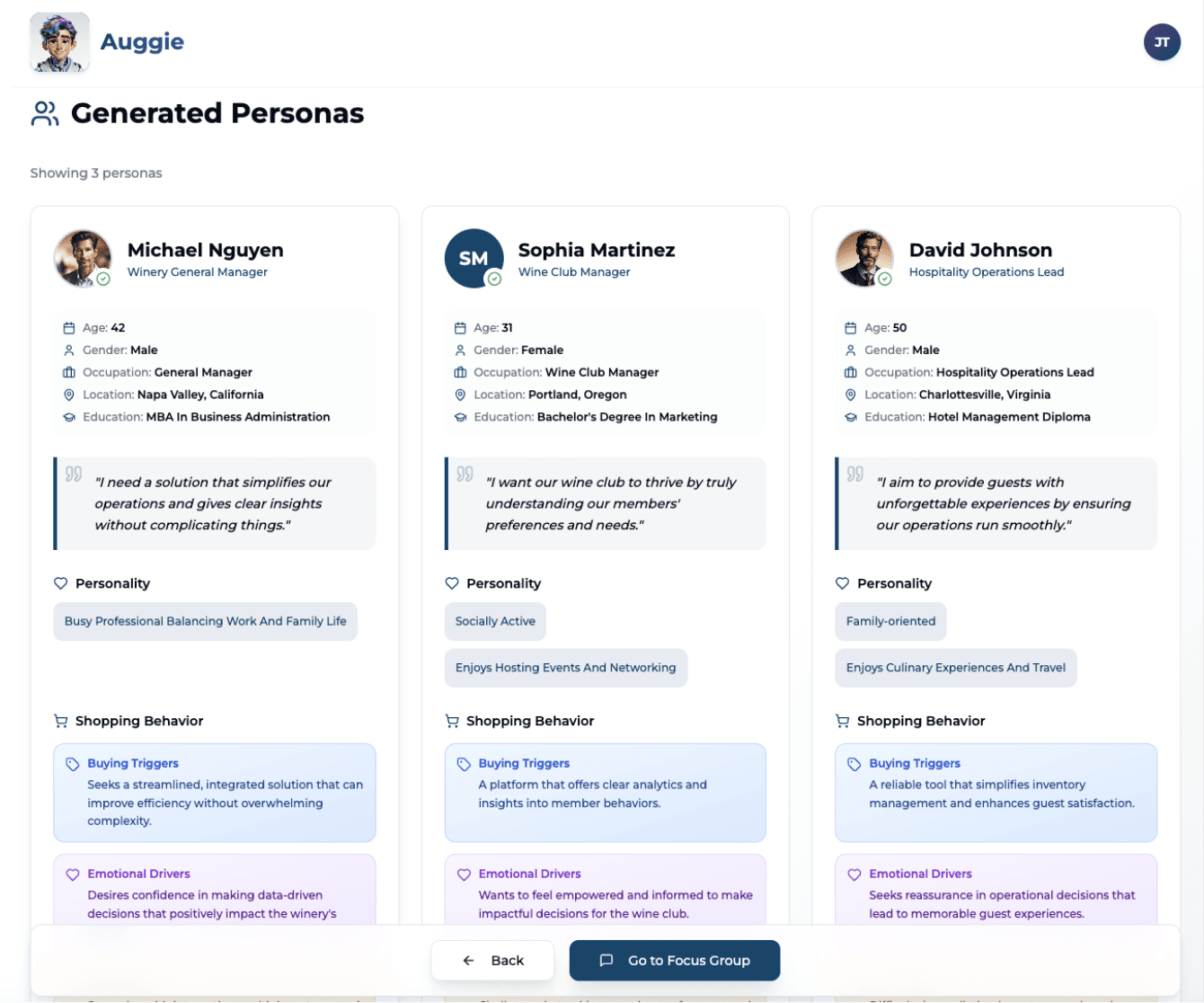
Personas are lenses, not answers. Before running a focus group, spend a minute reading the personas-how you interpret them determines every question you ask.
What Personas Actually Are
Personas represent tradeoffs, incentives, and constraints-not demographics. They're designed to:
- Disagree with each other
- Ask for different proof
- React emotionally, not just logically
What to Look For: Each persona should push the conversation in a different direction.
Reading Personas the Right Way
Focus on:
- What they care about first
- What they're skeptical of
- What would make them say "no"
- What proof they'd demand before trusting you
Persona: "Operations-focused winery manager who values clear ROI, time savings, and integration with existing systems."
You think: "This persona will challenge vague claims", "They'll want metrics, timelines, and proof", "They're skeptical of 'Al magic'"
You ask: "What would make you distrust this?", "What proof would you need before adopting this?"
When to Leave Personas As-Is
- They feel realistic, even if imperfect
- They disagree naturally
- They challenge your assumptions
When to Edit Personas
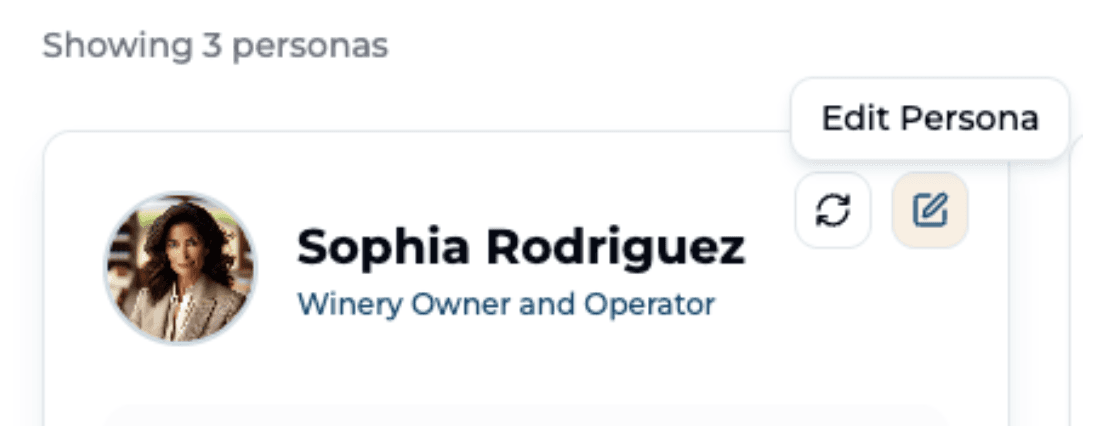
- Two personas feel interchangeable
- A persona contradicts your stated customer reality
- A role or context is clearly wrong
Personas as Question Strategy
Each persona should influence how you ask questions.
Example:
- Persona A: ROI-driven, skeptical -> Ask: "What would make this worth the effort?"
- Persona B: Innovation-oriented -> Ask: "What excites you about this approach?"
- Persona C: Risk-averse -> Ask: "What feels risky or unclear?"
What Good Persona Usage Looks Like
In focus groups:
- Let personas disagree
- Follow up on conflicting reactions
- Ask one persona to respond to another
Example: "You two see this very differently-why?"
Outcome: Insight, tradeoffs, messaging clarity.
Signals You're Using Personas Well:
Look for:
- Personas ask tough questions
- Responses feel slightly uncomfortable
- You hear objections you didn't expect
- Personas disagree without being forced
If that's happening, Auggie is working.
4. Running a Strong Focus Group
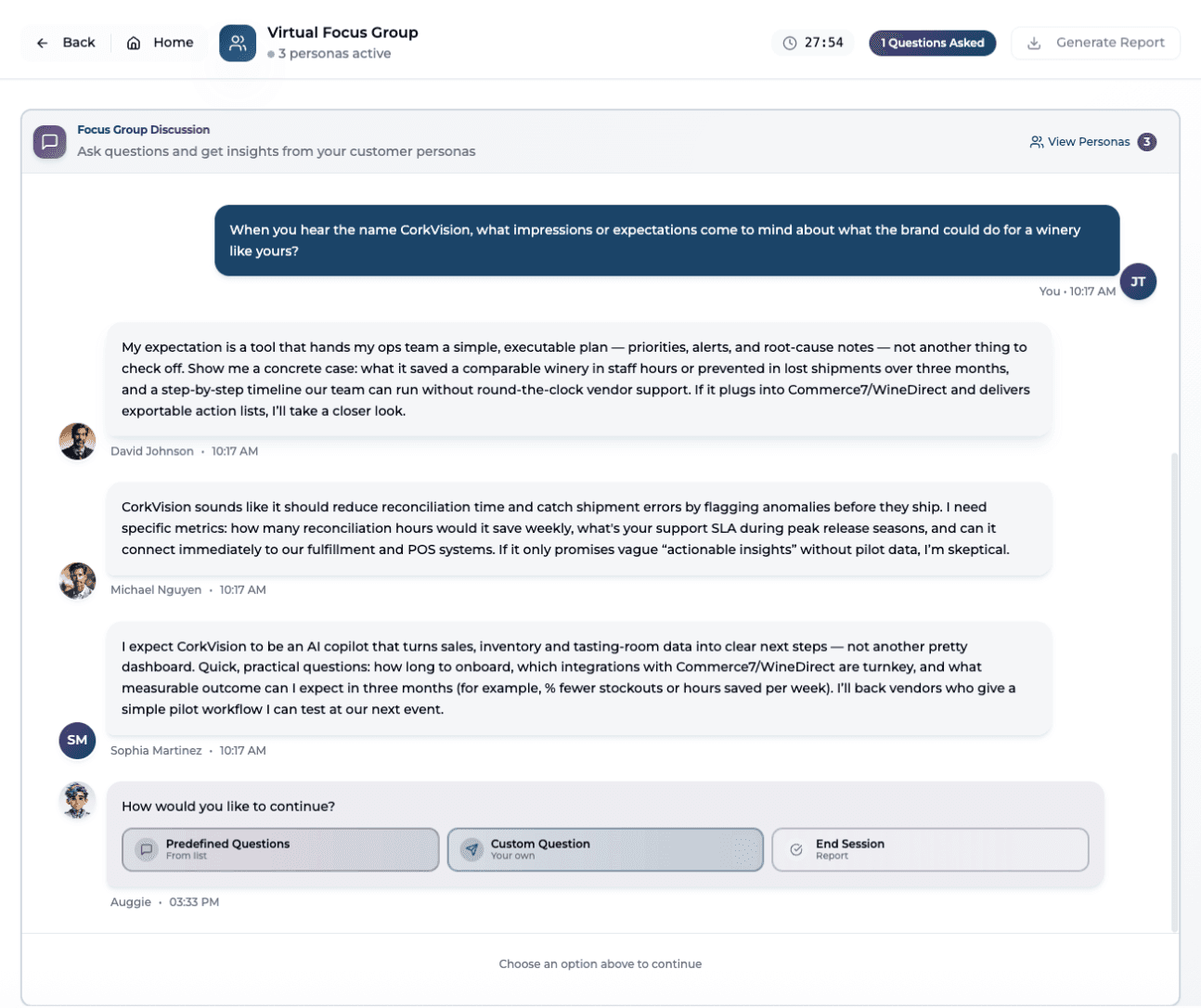
Core principle: Insight comes from tension, not agreement. Your role is to shape the conversation-what you ask, how you follow up, and where you apply pressure.
How to Think About Focus Groups
A strong session:
- Starts broad, then narrows
- Surfaces emotion before logic
- Forces tradeoffs
- Lets personas disagree
A weak session:
- Asks abstract questions
- Seeks validation
- Moves on too quickly
- Ends without synthesis
Opening the Session: First Questions Matter Most
- "What's your first reaction when you hear this?"
- "What stands out-positively or negatively?"
- "What expectations does this set for you?"
Why these work: Invite instinctive reactions, don't assume value, leave room for surprise.
- "Do you like this?"
- "Would you use this?"
- "Does this make sense?"
Why these fail: Encourage polite agreement, push toward yes/no answers, skip emotional response.
Asking Better Questions (Mid-Session)
Once personas are engaged, apply pressure thoughtfully.
Emotional & Perceptual Questions
Strong examples:
- "What excites you about this if anything?"
- "What makes you skeptical?"
- "What feels unclear or overpromised?"
Tradeoff & Friction Questions
This is where insight accelerates. Strong examples:
- "What would make this not worth the effort?"
- "What would you have to give up to adopt this?"
- "What's the risk in trusting a tool like this?"
Proof & Trust Questions
Strong examples:
- "What proof would you need before believing this?"
- "What questions would you ask the founder?"
- "What would make you distrust this claim?"
Why this matters: Proof questions expose sales friction. Trust is contextual, not declarative.
Using Persona-to-Persona Reactions
You can explicitly ask personas to react to each other. Strong examples:
- "Sophia, what do you think about David's concern?"
- "Angela, do you agree with Michael or see this differently?"
- "Who here disagrees most-and why?"
Directing Questions to Individuals vs. the Group
By default, questions go to all personas-great for patterns. Use directed questions when you want depth:
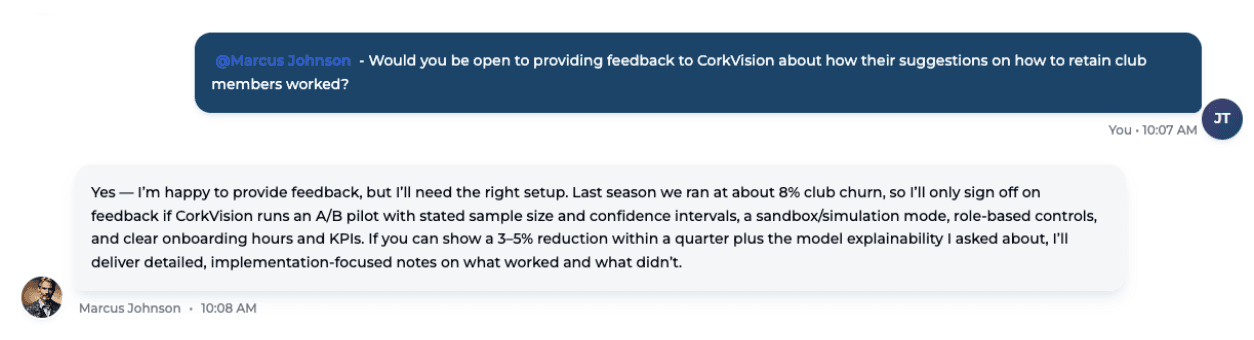
- You want a specific lens (ops vs. marketing)
- One persona reacted strongly
- You want to stress-test an edge case
Example: "David-from an operations perspective, what breaks first here?"
Knowing When to End the Session
A good session ends with synthesis, not exhaustion. Strong closing questions:
- "What would make this a clear yes?"
- "Who is this not for?"
- "What would you tell a colleague about this?"
What to Look For: You should leave with clear objections, proof gaps, and messaging adjustments.
Auggie provides the participants. You provide the direction. The best sessions: Feel slightly uncomfortable, Challenge assumptions, Reveal friction early.
5. Interpreting Outputs & Deciding What to Do Next
Core principle: Insight lives in patterns, not quotes. Auggie doesn't give you "the answer"-it gives you signals. Your job as a marketer is to interpret them correctly.
What Auggie Outputs Actually Are
Auggie outputs are:
- Directional
- Qualitative
- Designed to inform what to explore next
What to Look For: Repeated reactions, consistent skepticism, and sharp disagreements.
How to Read Persona Responses
You notice: Two personas push back on pricing, One persona is excited but asks for proof, Language around "effort" and "time" keeps appearing.
You conclude: "We have a perceived ROI problem, not a feature problem."
Next step: Refine messaging, Test proof points, Adjust onboarding narrative.
You notice: One persona says "I'd definitely use this"
You conclude: "We're validated."
Why this fails: Ignores objections, overweights enthusiasm, misses risk signals.
Patterns Matter More Than Opinions
Focus on:
- What multiple personas mention independently
- Where personas disagree-and why
- What language they naturally use
Avoid:
- Cherry-picking quotes
- Averaging sentiment
- Turning feedback into feature checklists
Using Disagreement as Strategy
Disagreement is not failure. It's a map.
Two personas disagree sharply.
You ask: "Why does this matter more to you?", "What would change your mind?"
You learn: Which segment is a better fit, Where positioning breaks down
Turning Insights into Next Steps
Every session should end with at least one concrete action.
Examples of strong next steps:
- Rewrite positioning using persona language
- Add proof points to landing pages
- Create a follow-up session focused on objections
- Test messaging with a new persona mix
Examples of weak next steps:
- "Let's think about this."
- "We'll revisit later."
- "Seems generally positive."
When to Run Another Session
Run another focus group when:
- You uncovered new objections
- You changed messaging or positioning
- You want to test a narrower hypothesis
Don't rerun sessions hoping for better answers to the same questions.
6. Using the Insights Report
Core principle: Turning conversation into confident decisions. When you end a focus group, Auggie generates a multi-section Insights Report. Each section serves a different purpose.
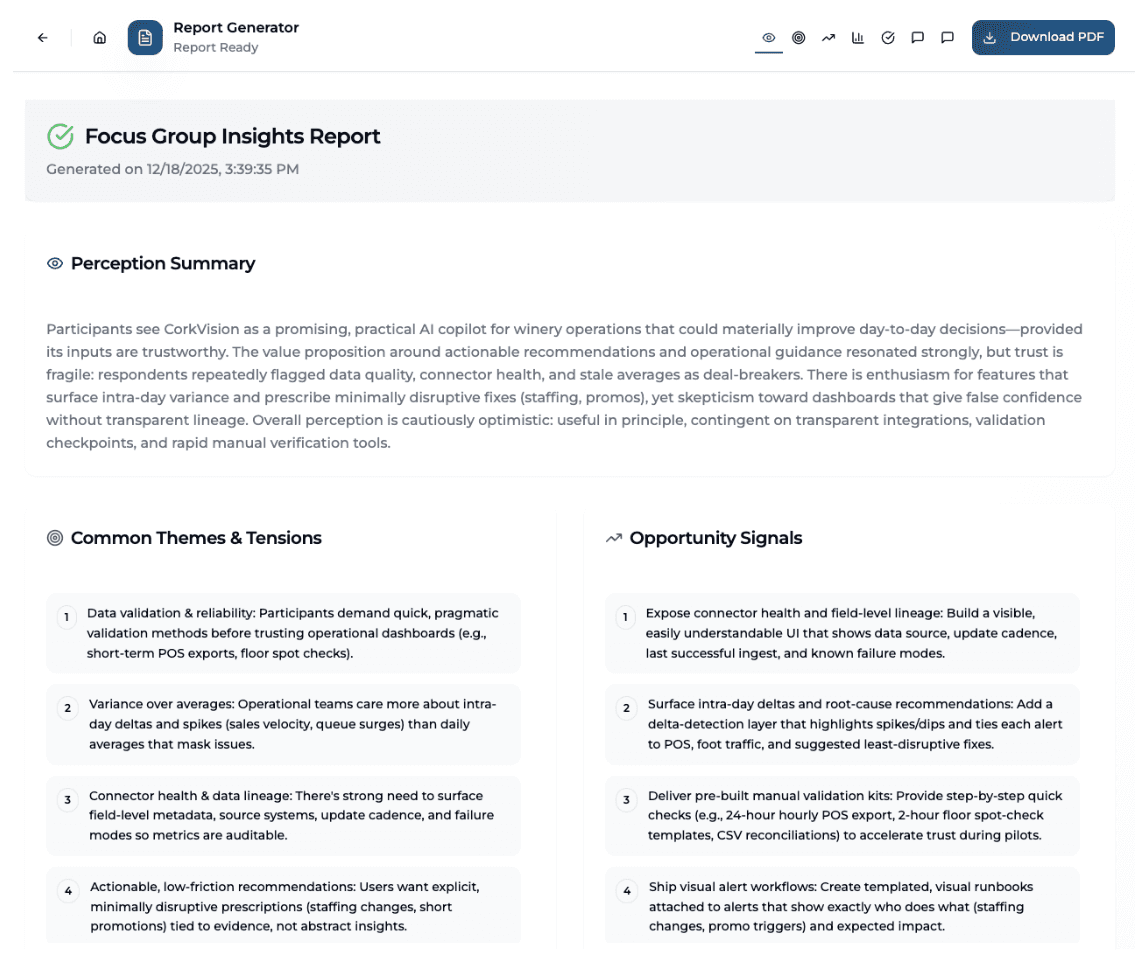
Report Overview: What Each Section Is For
| Section | Primary Purpose |
|---|---|
| Perception Summary | Executive-level framing |
| Themes & Tensions | Core customer conflicts |
| Opportunity Signals | Hypotheses for exploration |
| Key Findings | Validated takeaways |
| Recommendations | Directional next steps |
| Moderator Reflection | Research quality signal |
| Full Transcript | Evidence & nuance |
Perception Summary
What it is: The "headline," not the verdict-a compressed synthesis of how the group collectively perceives the brand or concept.
How to use it:
- You read: "Cautiously optimistic... value resonates... trust is fragile..."
- You conclude: "We're directionally right, but trust and validation are the gating issues."
- You use it to: Frame internal discussions, Set context for leadership, Guide what to explore next
Themes & Tensions
What it is: The strategic core repeated friction points that matter to users.
How to use it:
- You see: "Variance over averages", "Validation before trust", "Low tolerance for false confidence"
- You treat these as: Inputs into positioning, Constraints on product adoption, Signals for what messaging must address
Opportunity Signals
What it is: Hypotheses, not marching orders-what might unlock value if explored further.
How to use it:
- You read: "Expose connector health and lineage..."
- You think: "Trust visibility may matter more than new analytics."
- You respond by: Testing messaging, Designing follow-up focus groups, Prototyping lightweight validation concepts
Key Findings
What it is: What survived the conversation-the most defensible takeaways, supported across multiple personas and examples.
How to use it: Treat Key Findings as: Inputs to prioritization, Anchors for internal alignment, Guardrails for roadmap discussions.
Remember: These are qualitative findings-powerful, but not statistically representative.
Recommendations
What it is: Directionally useful, not prescriptive synthesized insights into suggested next steps.
How to use it: Read recommendations as: Strategic guidance, Hypotheses for pilots, Ideas to pressure-test.
Ask: "Which of these would most reduce adoption risk?"
Moderator Reflection
What it is: How much weight to give the session-tells you how the session behaved, not what users said.
How to use it: You use it to: Judge confidence level, Spot where follow-ups are needed, Understand session dynamics.
Example: "Highly pragmatic... preferred manual validation..."
You infer: "This group prioritized operational realism-future sessions should include live demos."
Why It Matters: Explains why certain insights surfaced and whether they're likely to generalize.
Full Chat Transcript
What it is: Evidence, not output-your source of truth, not your takeaway.
How to use it: You use it to: Validate interpretations, Pull direct quotes, Understand edge cases, Resolve internal debates.
The Report Is a Lens
The Insights Report doesn't tell you what to build. It tells you where clarity exists, where risk lives, and what to explore next. Used correctly, it:
- Sharpens positioning
- Reduces go-to-market risk
- Makes follow-up research smarter
7. How to Give Us Great Beta Feedback
We're building Auggie to help marketers make faster, more confident decisions. Your feedback directly shapes the product.
What We're Specifically Testing
Persona realism:
- Do personas feel like real people with real constraints?
- Do they disagree in ways that mirror your actual customers?
- Do their objections surface blind spots you hadn't considered?
Question flow:
- Do the predefined questions help you get started?
- Where did you want more guidance on what to ask?
- Were there moments you wanted to probe deeper but weren't sure how?
Report clarity:
- Did the Insights Report surface actionable takeaways?
- Were any sections confusing or less useful than others?
- Did you feel confident using the findings to make decisions?
What's Still Rough (Don't Report These)
We're actively improving:
- Discovery Form UX: We know the five questions can feel dense. We're testing a guided wizard flow.
- Transcript length: For sessions with 10+ questions, the transcript gets long. We're exploring collapsible sections and inline filtering.
- Persona editing: The edit interface works but isn't as smooth as we want. We're redesigning it.
Do report these:
- Personas feeling too agreeable or generic
- Moments where you wanted guidance on what to ask next
- Any friction in the focus group flow itself
The 3-Question Feedback Framework
After each session, share:
1. What surprised you? (positive or negative)
Example: "I expected personas to be more agreeable, but they pushed back hard on pricing-exactly what I needed."
2. Where did you get stuck? (workflow, questions, interpretation)
Example: "I wasn't sure how to respond when two personas agreed too quickly. Should I have pushed harder?"
3. What would make your next session better?
Example: "I wish there was a 'suggested follow-up questions' feature after personas respond."
How to Share Feedback
After your session:
Fill out the Beta Feedback Survey- Share your Insights Report link with us along with:
- What you were trying to learn
- What worked
- What you wish had happened differently
In our debrief: Schedule a debrief with us so we can run through your feedback live.
We're especially interested in:
- Moments that surprised you
- Where personas felt too agreeable
- Where you wanted to push deeper but couldn't
- Questions you wished Auggie suggested